





About This Course
The Advanced Excel course is one of the most valuable professional training programs for students and working professionals who want to improve their data management, reporting, and analytical skills. In today’s digital business environment, Microsoft Excel is used in almost every industry including finance, accounting, banking, marketing, HR, operations, logistics, administration, education, and business management. Because of its wide industrial usage, professionals with strong Excel skills are always in demand. This Advanced Excel course is specially designed to help students and professionals master advanced Excel functions, reporting techniques, automation tools, and data analysis methods used in real business environments.
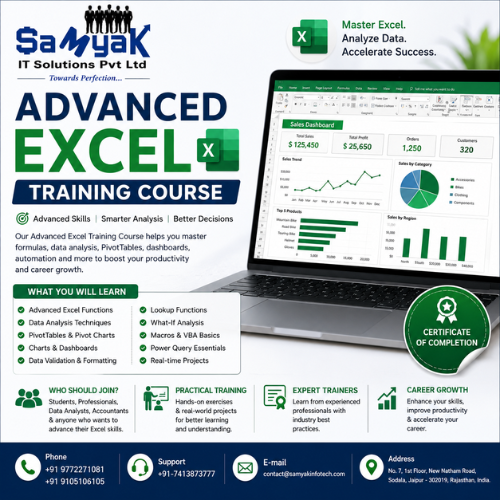
The Advanced Excel course focuses on practical learning and industry-oriented training. Students learn how to manage large datasets, create professional reports, analyze business information, automate repetitive tasks, and build interactive dashboards. The course covers everything from basic Excel concepts to advanced formulas, functions, charts, Pivot Tables, data visualization, and automation techniques. Whether you are a beginner or already familiar with Excel, this Advanced Excel course helps you gain professional-level skills required in modern office and corporate jobs.
Excel has become an essential business tool because companies depend on data for decision-making, reporting, planning, budgeting, forecasting, and performance tracking. Professionals who know how to use advanced Excel features can improve productivity, reduce manual work, and make business operations more efficient. This Advanced Excel course helps students understand how businesses use Excel for real-time reporting and data management in daily operations.
One of the biggest advantages of joining an Advanced Excel course is that it opens career opportunities across multiple industries. After completing this course, students can work as MIS Executives, Data Analysts, Reporting Executives, Operations Executives, Business Analysts, Financial Analysts, HR Executives, and Office Administrators. Many companies specifically look for candidates with strong Advanced Excel knowledge because data handling and reporting are critical parts of business operations.

The Advanced Excel course includes training in important functions such as VLOOKUP, HLOOKUP, XLOOKUP, IF formulas, SUMIF, COUNTIF, INDEX MATCH, text functions, date functions, logical formulas, and data validation techniques. These formulas help students perform calculations, manage databases, and automate data-related tasks efficiently. Understanding formulas and functions is essential because they are widely used in corporate reporting and office management work.

Pivot Tables and Pivot Charts are another major part of the Advanced Excel course. Students learn how to summarize large amounts of data quickly, create reports, analyze trends, and generate insights for decision-making. Pivot Tables are commonly used in finance departments, sales reporting, inventory management, HR analysis, and business operations because they simplify complex data analysis tasks.
Data visualization is also an important area covered in the Advanced Excel course. Students learn how to create professional charts, graphs, dashboards, and interactive reports that help businesses understand performance metrics clearly. Visual reports improve communication and help management teams make informed business decisions. Companies highly value professionals who can present data in a visually attractive and understandable format.
Automation is another powerful feature of Excel that is covered in this Advanced Excel course. Students learn the basics of Macros and VBA (Visual Basic for Applications) to automate repetitive tasks and improve efficiency. Automation helps businesses save time, reduce errors, and streamline workflows. Professionals with automation skills often receive better career opportunities because automation improves operational productivity.
The Advanced Excel course also focuses on data cleaning and data management techniques. Businesses often deal with incomplete, duplicate, or unorganized data, and professionals need proper skills to clean and structure information accurately. Students learn practical methods to organize data, remove duplicates, apply filters, sort information, and maintain accurate business records.
Another important topic included in the Advanced Excel course is dashboard creation. Dashboards are widely used by businesses to monitor KPIs (Key Performance Indicators), sales performance, financial reports, employee productivity, and operational data. Students learn how to design dynamic dashboards using charts, Pivot Tables, slicers, and formulas to create professional business reports.
The demand for Advanced Excel professionals continues increasing because organizations rely heavily on data analysis and reporting. Even with the rise of modern technologies and software tools, Excel remains one of the most widely used business applications globally. Companies prefer employees who can efficiently manage data, generate reports, and support business decisions using Excel tools.
This Advanced Excel course is also extremely beneficial for students preparing for office jobs, corporate careers, banking positions, finance roles, and administrative work. Many interviews and job assessments include Excel-related questions because employers consider Excel proficiency an important professional skill. Learning Advanced Excel improves employability and increases chances of getting higher-paying jobs.
Working professionals can also benefit greatly from this Advanced Excel course because advanced Excel skills improve workplace productivity and career growth opportunities. Employees who can automate reports, analyze business data, and create professional dashboards often receive promotions and leadership responsibilities in organizations.
The Advanced Excel course is suitable for commerce students, management students, office staff, entrepreneurs, accountants, analysts, and business professionals. Even small business owners can use Excel skills to manage inventory, sales reports, expenses, customer databases, and financial records more efficiently.
Freelancing opportunities are also available for skilled Excel professionals. Many businesses hire freelancers for report creation, dashboard development, data analysis, MIS reporting, and automation projects. Students who complete this Advanced Excel course can work independently and provide Excel-based business solutions to clients.
This Advanced Excel course follows a practical training approach where students work on real business examples, reporting tasks, dashboard projects, and data analysis exercises. Practical learning helps students understand how Excel is used in real office environments and corporate workflows. Students gain confidence by solving practical assignments and creating professional reports during training.
Another important benefit of the Advanced Excel course is that it improves analytical thinking and decision-making abilities. Students learn how to interpret data, identify trends, analyze performance, and support business planning using Excel tools. Analytical skills are highly valuable in today’s data-driven business world.
The Advanced Excel course also introduces students to Power Query and advanced data transformation techniques. These tools help users import, clean, merge, and process data from different sources efficiently. Modern organizations use these features for advanced reporting and data management tasks.
If you want to improve your office productivity, build a successful corporate career, increase job opportunities, or become a professional data analyst, then joining an Advanced Excel course can be an excellent decision. Excel skills are useful in almost every industry and provide long-term career benefits for students and professionals.
This Advanced Excel course is designed to help students become industry-ready professionals by combining practical knowledge, reporting skills, analytical techniques, and automation concepts. Whether your goal is to secure a corporate job, improve office efficiency, work in business analysis, or support management decision-making, this course provides the right foundation for professional growth and career success.